
The Online King Sejong Institute is a free online Korean-language learning platform run by the King Sejong Institute Foundation. Anyone in the world can study Korean at the right level for them. In Semester 4 of 2026, an introductory course opens for people who are new to Korean. It is free for everyone regardless of nationality or status of stay.
About the Course
- Course name: King Sejong Institute Introductory Korean Course
- Level: People learning Korean for the first time (starting from Hangul)
- How it works: Video lectures (VOD) plus 5 live video (Zoom) classes, a 5-week course
- Completion requirement: A certificate of attendance is issued for watching at least 70% of the video lectures and attending at least 70% of the live video classes
- Tuition fee: Free
- Who can join: Anyone who wants to learn Korean
Semester 4 Schedule (2026)
| Item | Date (Korea time) |
|---|---|
| Registration period | Monday, 26 October to Sunday, 8 November 2026 |
| Study period | Monday, 16 November to Sunday, 20 December 2026 |
The elementary, intermediate, advanced, business Korean, and reading and writing courses already started on 12 October in the same Semester 4 (registration from 21 September to 4 October). The schedule may change depending on the circumstances of the King Sejong Institute Foundation. Source: notices on the Online King Sejong Institute site, “2026년 온라인 세종학당 개강 일정 안내” (2026 Online King Sejong Institute Opening Schedule Guide, 1 January 2026) and “2026년 온라인 세종학당 4학기 수강신청 안내” (2026 Online KSI 4th Term Course Registration, 17 September 2026).
How to Register
- Go to the Online King Sejong Institute official website.
- Create an account and log in.
- During the registration period (26 October to 8 November), choose the introductory course and apply.
- From the start date (16 November), take the classes in “나의 강의실” (My Classroom).

- Press 회원가입 (Join) to create an account.
- Press 로그인 (Log in) to log in.
- Open the course list under 한국어 과정 (Korean courses).
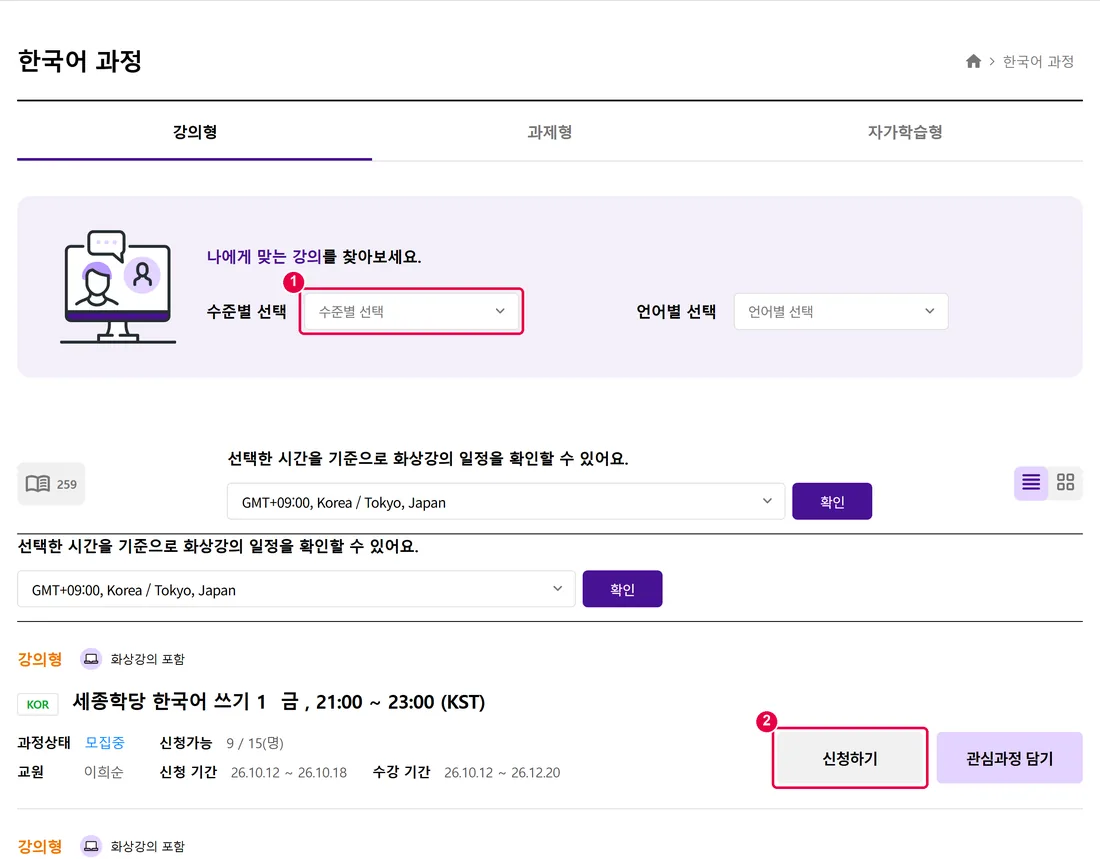
- Under 수준별 선택 (Select by level), choose 입문 (Introductory).
- Press 신청하기 (Apply) next to the course you want. Registration works only when you are logged in and inside the registration period.
Frequently Asked Questions
Q. Can foreigners living in Korea apply? Yes. The Online King Sejong Institute is open to anyone, inside or outside Korea.
Q. Is there any cost to register? All courses are free. You do not need to enter any card or bank account details.
Q. If I miss this semester, when can I apply again? The introductory course opens four times a year. Check the 공지사항 (Notices) of the Online King Sejong Institute for the 2027 schedule.
Contact
- Online King Sejong Institute course inquiries: 02-6970-5000, onse1@ksif.or.kr
- System inquiries: 02-6674-1740, online1@ksif.or.kr